Redesigning StockEdge
The Stock Details Page for StockEdge
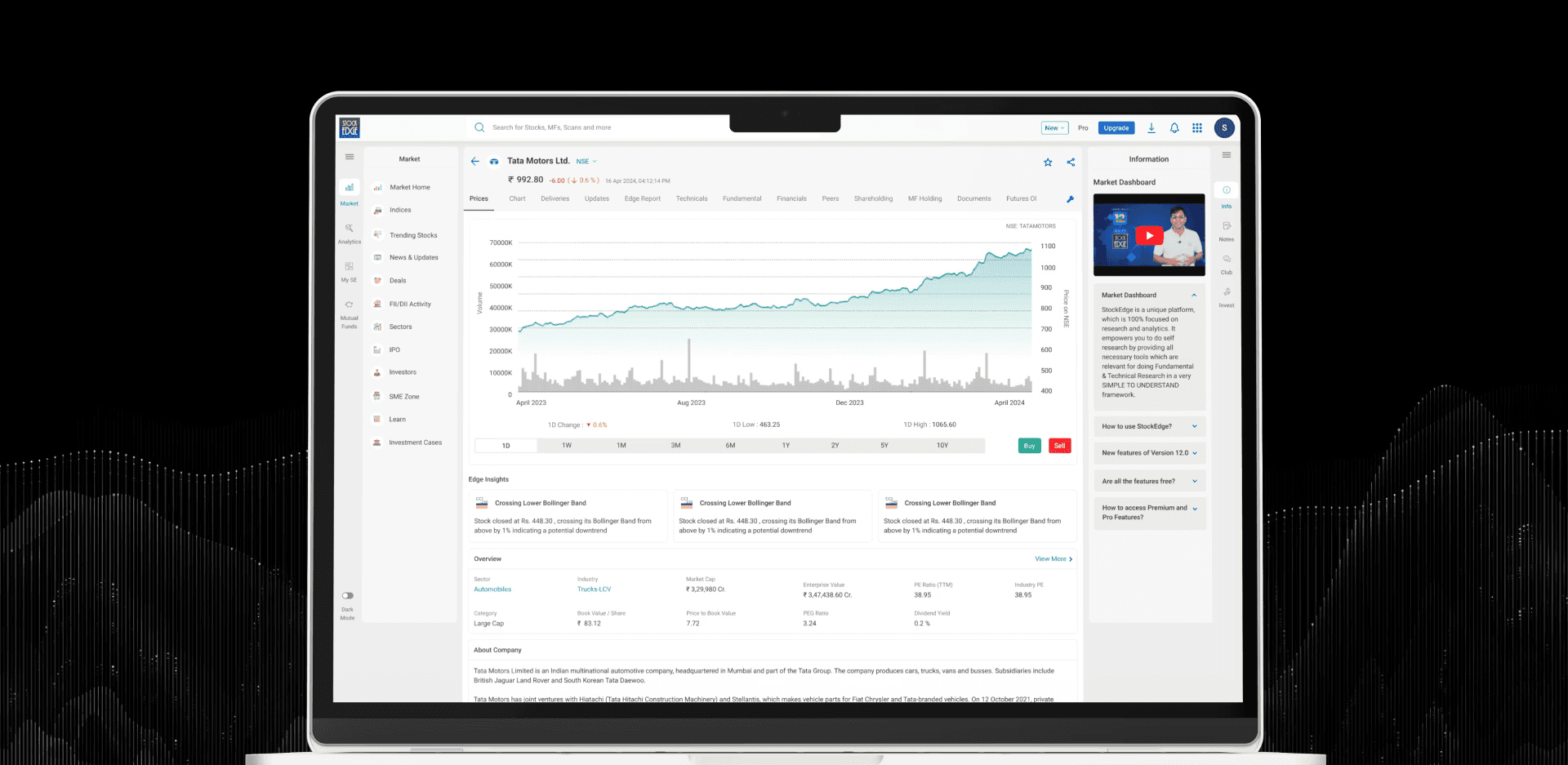
Project Description
The Stock Details is one of StockEdge’s most visited and important part, used by both novice investors and experienced traders. The old design suffered from lack of information, weak hierarchy and cluttered layout, leading to user frustration and low engagement.
After a complete UX redesign, the page saw:
+28% time on page and +15% higher feature interaction
Bounce rate drop from 47% → 31%
+78% increase in Buy/Sell CTA clicks
+84% rise in Peer Comparison usage
In-app feedback improved from 3.4 → 4.6
The redesign transformed the experience into a clear, accessible, and decision-focused interface, driving both user satisfaction and business impact.
Problem
The Stock Details section was heavily facing:
High drop-off rate from the page.
Users struggling to find value in the page.
Lack of accessibility compliance (WCAG 2.2).
Mobile responsiveness issues
Process
I have followed here the 3D (Discover, Define, Design) process for this design problem. Here I focused on User Research first where I have done secondary research to get a perspective and data from different sources and prepared for primary research where I have done user interviews, conducted user survey to validate and know better about the problems from user end.
Discover (Secondary Research)
Users' Demographics
Segment | Age | Goals |
|---|---|---|
Beginners | 18–27 | Understand basics quickly, see simple trends |
Short-Term Investors | 25–40 | Fast scan of price, trend, news, key ratios, quick actions |
Long-term Investors | 30–55 | Fundamentals, financials, peer comparison, risk signals |
Power Users / Traders | 25–45 | Deep charts, indicators, short-term signals |
Stock quote pages are the 2nd most visited feature on most fintech platforms after portfolios (source: UXCam Fintech UX Report, 2023).
StockEdge’s internal data shows 30% of daily app users land on a stock page, making it a high-impact opportunity for user retention and trade initiation.
According to Nielsen Norman Group, poor data grouping in financial apps leads to a 36% higher bounce rate and 22% lower retention after the first visit.
App Store & Play Store Reviews
“Too much info crammed into one screen”
“Difficult to make quick comparisons”
“Wish it were easier to digest fundamentals and trends”
Define Phase
User Interviews
To understand diverse user needs, I conducted User Interviews with 8 participants, segmented according to my demographics research earlier. Here I focused on uncovering:
Decision-making patterns before buying/selling a stock
Pain points in navigating dense financial data
Information priorities (what they look for first)
Barriers around usability, jargon, and accessibility
Questions
What do you check first on a stock page?
What feels confusing or unnecessary?
What would help you make quicker decisions?
What makes you return to this page?
Key Insights
"I Couldn’t find important metrics like peer comparison, Delivery, Latest Results which were important for making basic decisions."
“Speed and trust. If the data is reliable and fast to scan, this becomes my daily dashboard. Basically could not imp data and feel that I am not getting any stand out value out of this so I actually do not usually come back here. Prefer to see other platforms like Screener, Tickertape, Tradingview.”
"Aesthetic wise, I do not feel very good about this, It looks outdated compared to other platforms."
User Survey
I have done user survey to validate the insights on a large scale which will help me to analyse further and take design decisions according to that. 105 responses were gathered from the survey.
Q1: How often do you use the Stock Details Page?
Daily – 35% | Weekly – 21% | Occasionally – 15%
Q2: How difficult is it to interpret key data points?
Difficult – 62% | Neutral – 28% | Easy – 20%
Q4: What’s the biggest frustration?
Lack of Important Data – 68% | Poor layout – 42% | UI – 35%
Q5: Would a clean layout with categorized views of key data improve your experience?
Yes – 92%
Usability Testing
I wanted to dig deeper and find user pain points and also validate the previous problems I got. So I have conducted usability testing before going into my Design solution phase.
Participants- 10 users
3 Beginners (0–1 year experience)
5 Active investors (1–3 years experience)
2 Power users (5+ years experience)
Devices: 7 mobile-first, 3 desktop
Task | Purpose |
|---|---|
Find the current price and today’s % change | Test info hierarchy |
Read the latest news related to this stock | Test content discoverability |
Switch chart timeframe and add an RSI indicator | Test advanced feature access |
Add this stock to watchlist and set an alert | Test action discoverability |
Compare this stock with peers | Test navigation efficiency |
Key Findings
Beginners needed ~25–30 seconds to find the current price.
Average completion time for multi-step tasks was 3x longer than expected.
80% of participants failed to compare with peers without hints.
Users spent >1 minute just to apply RSI Indicator in Chart and some abandoned the task.
Design
Ideation & Solution-Driven Moves
Here’s what I have done in the brainstorming / design phase to reach this solution, combining insights and creative thinking:
Prioritized Features using User Value vs Effort
Decided that how to show valuable insights to users so that they feel they are getting some real value here
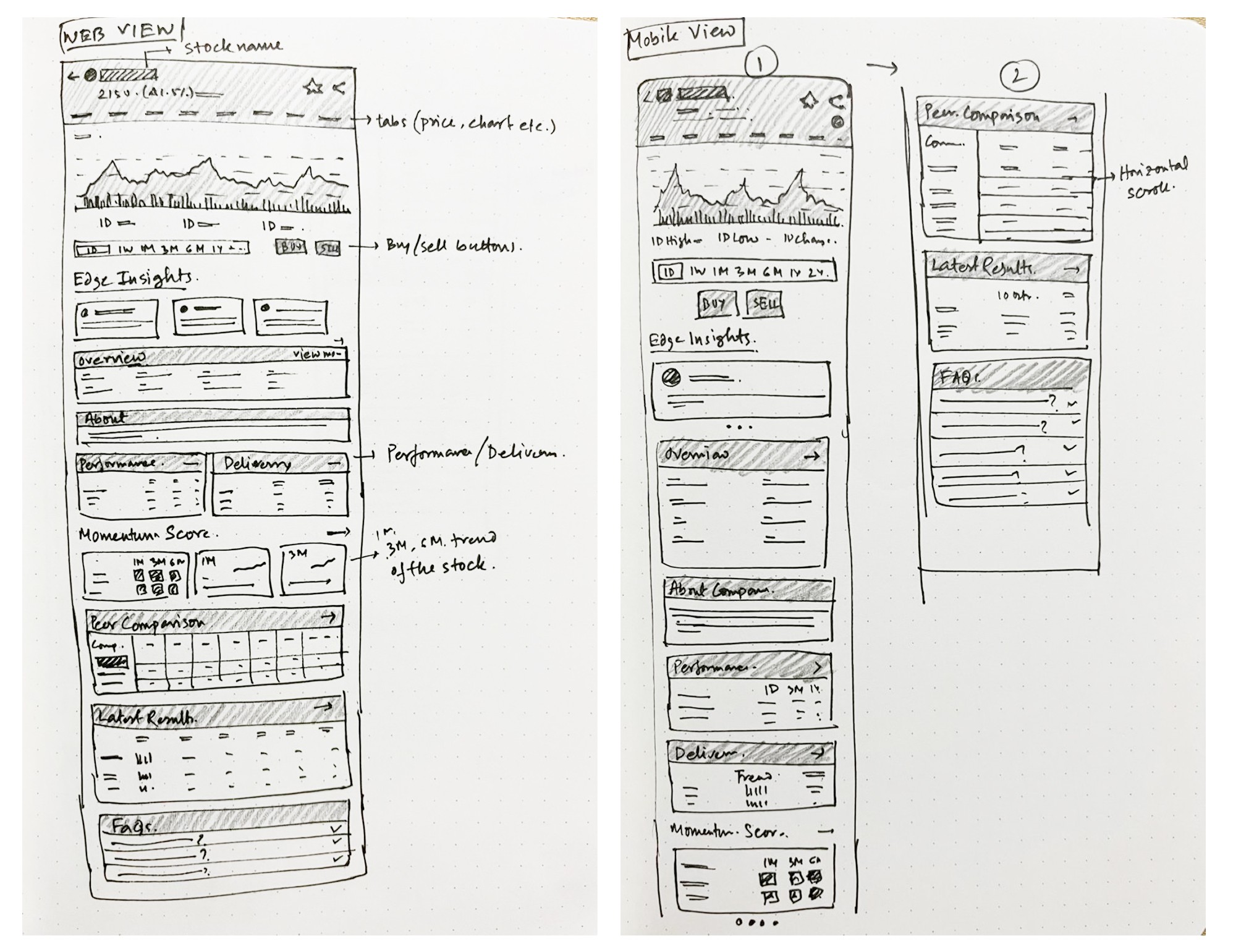
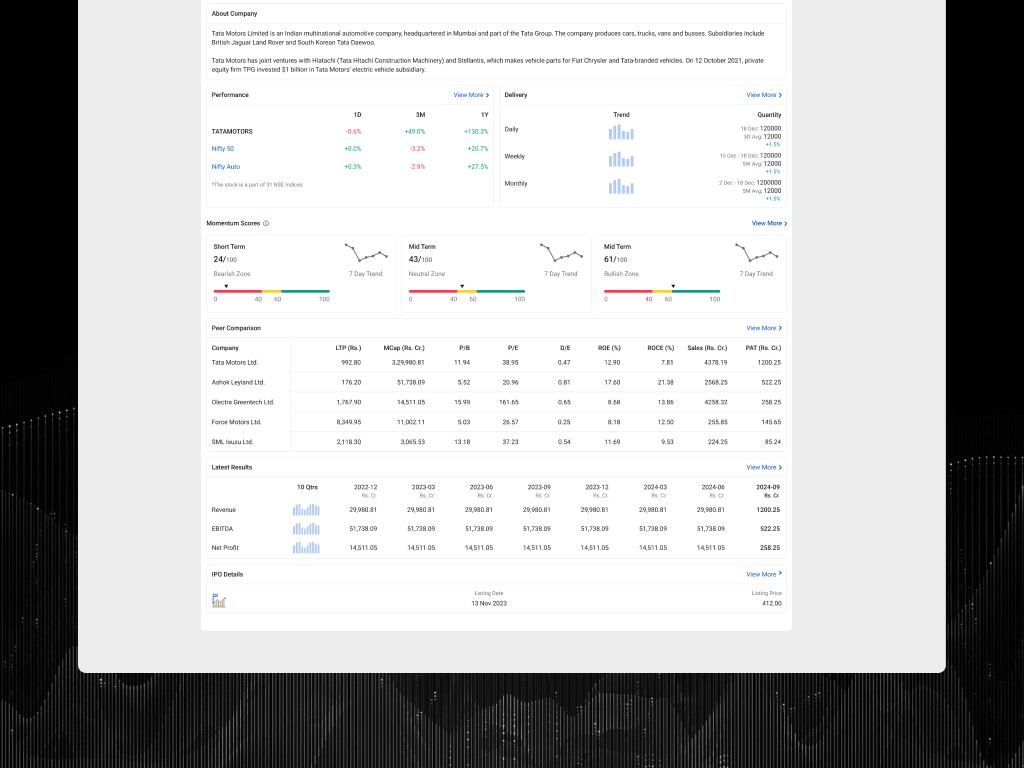
Peer Comparison, Latest Results, Delivery and FAQs should be showcased first hand to give the value
Wireframes & Low-Fidelity Prototypes
Explored multiple layouts: some with persistent CTAs, some with floating action bars, others with sticky snapshot headers.
Tested readability of layout with large text and different device sizes.
Design System / Visual Consistency
Ensured consistent design tokens (colors, typography) especially for differences (green/red, press/hover states).
Unified UI elements so CTAs look consistent everywhere.
Accessibility-First Mindset
Design with color contrast, use colorblind-friendly palettes.
Ensure tap targets, spacing, keyboard focus are considered.
Innovative Enhancements with feature
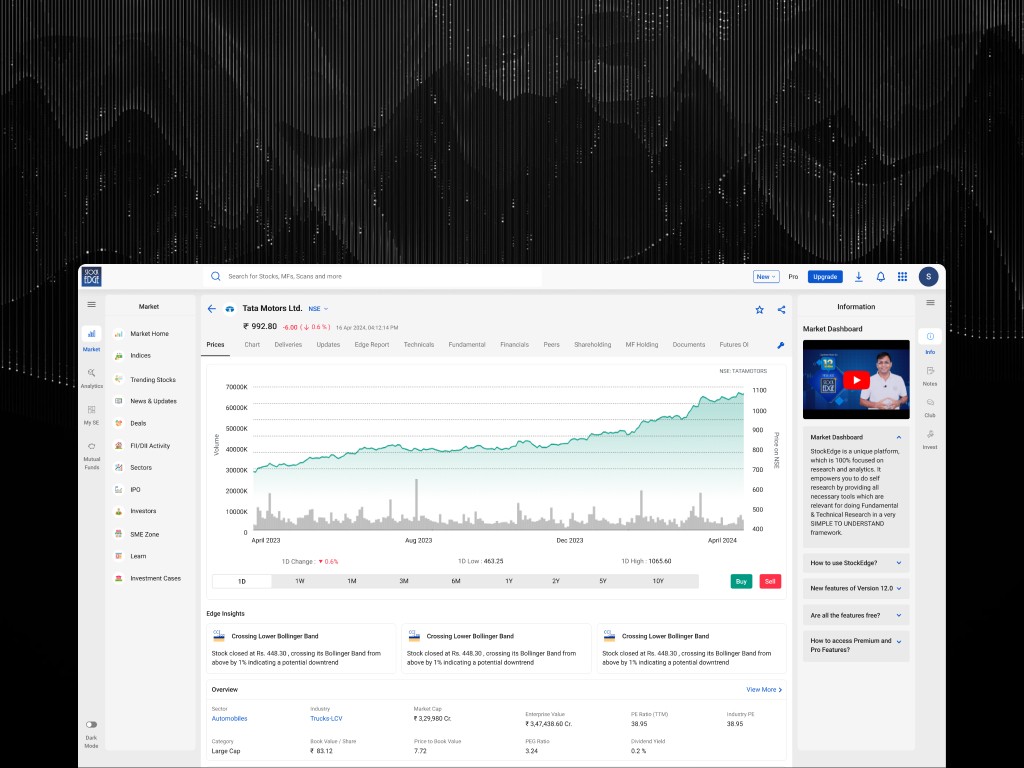
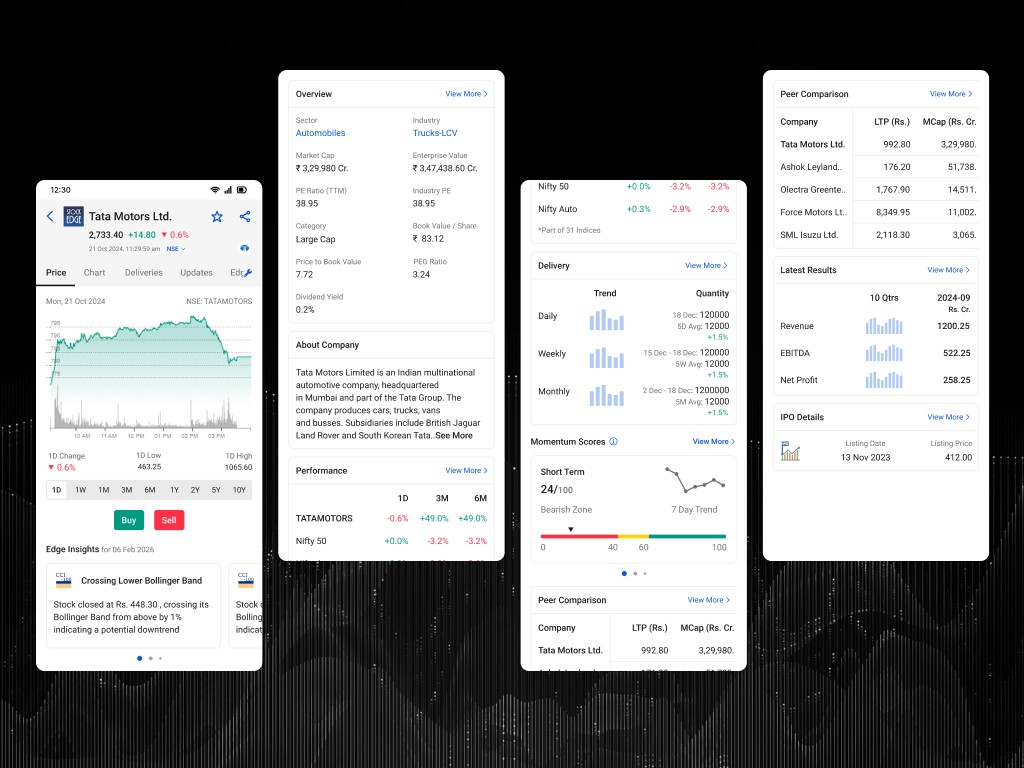
Momentum Score- an advanced proprietary scoring framework that leverages artificial intelligence to analyze stock momentum in different timeframes. Here users will find three momentum scores corresponding to different time horizons, accompanied by a comprehensive trend analysis. Score Horizons - 1 Month, 3 Months & 6 Months. The 1 Month and 3 Months Scores display the trend over the past seven days, while the 6 Months Score shows the trend over the past seven weeks.
Side-by-Side Analysis
Area | Old Version Problems | What Changed in Redesign/Design Decisions | Why It’s Effective |
|---|---|---|---|
Information Hierarchy | Price and % change were buried, new users take long to find current price, the layout didn’t immediately convey what’s going on. | The redesign introduces a prominent price + % change up top with trending visual cues. Key summary info is shown immediately upon page load. | Cuts time to first insight. Users know their stock’s state immediately. Reduces anxiety, increases confidence. |
Navigation & Content Flow | Users had to switch tabs for important info and complex navigation. | The new version seems more integrated with clickable sections with important info. | Keeps users in one flow which prevents loss of mental model. Faster retrieval, less cognitive load. |
CTA Visibility | Old CTAs were hidden or buried, inconsistent placement. | The redesign appears to place action buttons (watchlist, alerts) in more expected locations (top or clearly visible sections) rather than hiding them deep. Sticky at top and more visually emphasized. Buy/Sell button indication with Green and Red | Improves feature adoption, reduces number of clicks, improves conversion for key tasks. |
Chart Tools & Advanced Features | In the old version, chart timeframes and indicators were buried or required many taps. Power users had to navigate several layers. | The new design surfaces important chart controls earlier; time period (1D etc.) is easily toggled, likely chart tools are closer- more discoverable (examples: switching timeframe, seeing price data). | Empowers power users, increases satisfaction. Also reduces friction for intermediate users who want some advanced features. |
Accessibility & Mobile Usability | Old version suffered with large-text settings breaking layouts, low contrast and missing support for accessibility (keyboard, screen readers). | In the redesign, there’s likely better contrast, clearer typography, more responsive layout (mobile vs desktop), possibly better scalable text and clearer iconography. | Makes the app more inclusive. Helps all users, especially those with disabilities or different device preferences. Enhances user satisfaction & retention. |
Usability Testing on Prototype
Objectives
Validate whether the redesigned Stock Details Page:
Improves information findability for all experience levels
Enables faster decision-making
Reduces confusion and errors
Supports accessibility and mobile usability
Increases engagement with key actions (Watchlist, Alerts, Chart tools)
Participants
Total: 12 participants across 3 user segments
4 Beginners (0–1 year experience)
5 Active retail investors (1–3 years)
3 Power users/traders (5+ years)
Devices: 8 mobile-first, 4 desktop
Task | Goal | Measured By |
|---|---|---|
Find stock price and today’s % change | Test information hierarchy | Time to first insight, success rate |
Locate and read the latest news about this stock | Test content discoverability | Time, errors, recall accuracy |
Switch chart timeframe (1D → 1W → 1M) and add RSI indicator | Test advanced tool access | Steps taken, errors, success |
Add the stock to Watchlist and set a price alert | Test CTA discoverability | Task success, clicks to complete |
Compare this stock with two peers | Test navigation + comprehension | Steps, time, correct identification |
Key Findings
Avg. time to find price & change dropped from 21s → 7s.
Active users described the new layout as “feeling like one dashboard instead of scattered pages.”
“Before, I couldn’t read half the numbers. Now it just works.”
Time to add RSI dropped from 1m15s → 28s.
Beginners reported less anxiety and “knew where to look instantly.”
Live Link
If you wish to see the live design, Kindly visit here- Click Here
Impact after Launch
Increased Engagement
Time on page rose by 70%, showing users explored more and stayed longer.
Reduced Bounce
Bounce rate dropped from 47% to 31%, indicating improved clarity and usability.
Boosted Actions
Buy/Sell CTA clicks increased by 78% due to better placement and data context.
Improved Discoverability
Peer comparison feature usage grew by 84% after better navigation and visibility.
Higher Satisfaction
In-app feedback score improved from 3.4 to 4.6, reflecting better user experience.
Conclusion
The StockEdge Stock Details Page redesign wasn’t just a UI upgrade- it solved real user frustrations with thoughtful UX interventions rooted in research. The success of this project lies in how deeply it aligned with both user goals and business metrics.